Authentication & Authorization / Protocol
SSH Architecture & Authentication
Secure Shell (SSH) provides encrypted remote login, command execution, file transfer, and tunneling. Before user authentication, the client must decide whether it trusts the server host key. That trust can come from a previously pinned bare key, independent fingerprint verification, DNSSEC-protected SSHFP policy, or a provisioned OpenSSH host-certificate authority.
SSH and TLS use different trust and protocol profiles
| Axis | TLS 1.3 | SSH v2 / OpenSSH |
|---|---|---|
| Typical server trust | Web PKI uses configured X.509 trust anchors and hostname validation; private deployments can use other configured anchors or pinning. | Bare host-key pinning/TOFU, SSHFP under a configured DNSSEC policy, or configured OpenSSH host-CA trust. |
| Client authentication | Optional and application-defined; mTLS is one possibility. | SSH user authentication is a protocol phase and may use public keys, certificates, passwords, or other enabled methods. |
| Negotiation and framing | TLS 1.3 algorithms and record protocol as specified by RFC 9846. | SSH transport, key exchange, host-key algorithms, ciphers, and MAC/AEAD choices under SSH/OpenSSH specifications. |
| Interoperability | Similar primitives such as X25519, AES-GCM, or ChaCha20 may appear. | The wire formats, transcript, key derivation, algorithm names, and trust objects are not interchangeable with TLS. |
Host-key verification precedes user authentication
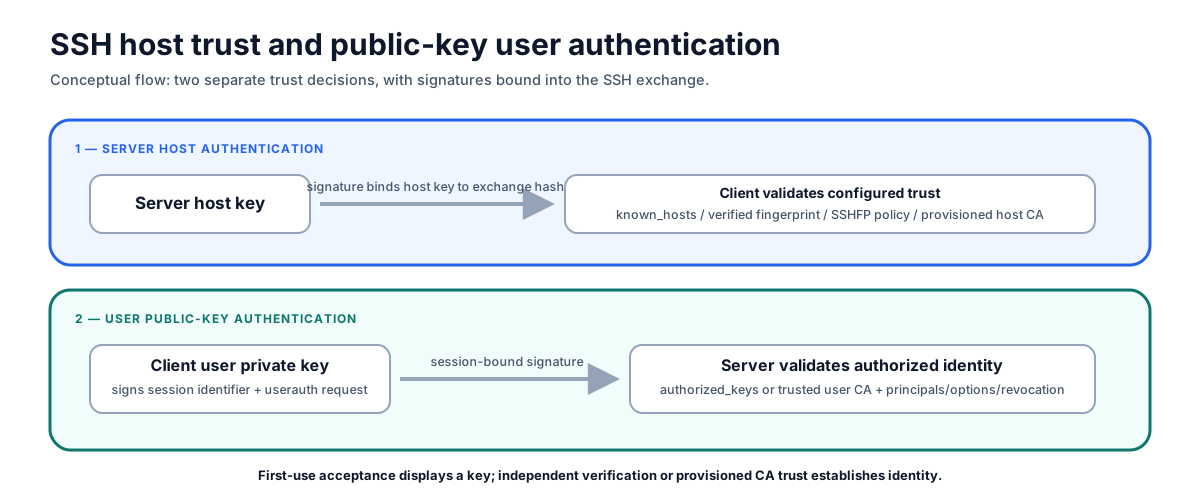
Server host authentication and user public-key authentication are separate trust decisions; both signatures are bound into the SSH exchange.
On a first connection with an unknown bare host key, OpenSSH’s current default StrictHostKeyChecking ask prompts the user before adding it to known_hosts. The prompt displays a key but does not independently prove the server’s identity. Verify the fingerprint through a separate authenticated channel before accepting it. accept-new is an explicit alternative setting, not the default.
A changed key can indicate legitimate replacement, rebuilt infrastructure, DNS/IP reassignment, or interception. Investigate before removing the old entry. StrictHostKeyChecking no permits changed keys subject to documented restrictions and is not equivalent to authenticated trust.
Key type and signature algorithm are separate
The following status labels are journal selection guidance, not universal OpenSSH policy:
| Credential or algorithm | Journal use | Boundary |
|---|---|---|
Ed25519 / ssh-ed25519 |
Preferred general-purpose user and host key where supported. | RFC 8032 signatures are deterministic; implementation side-channel resistance still depends on the implementation. |
FIDO-backed sk-ssh-ed25519@openssh.com |
Preferred for high-value interactive user authentication when physical presence or local verification is useful. | Requires supported FIDO hardware/middleware and a recovery/spare-key process. Resident credentials and verification requirements are policy choices. |
RSA key with rsa-sha2-256 or rsa-sha2-512 |
Compatibility option when Ed25519 is unavailable. | An RSA key is not synonymous with the legacy SHA-1 ssh-rsa signature algorithm. Disable ssh-rsa without unnecessarily rejecting RSA SHA-2. |
| ECDSA | Use where ecosystem or compliance constraints require it and the implementation is trusted. | ECDSA requires a unique unpredictable nonce or a correct deterministic construction such as RFC 6979; nonce reuse exposes the private key. |
ssh-dss (DSA) |
Do not enable for new or normal deployments. | OpenSSH disables it by default; “prohibited” requires a cited local policy rather than the protocol alone. |
Check the negotiated algorithms with current client/server configuration. Do not copy a historical algorithm list into policy without testing both endpoints.
OpenSSH certificates replace per-host key distribution with CA trust
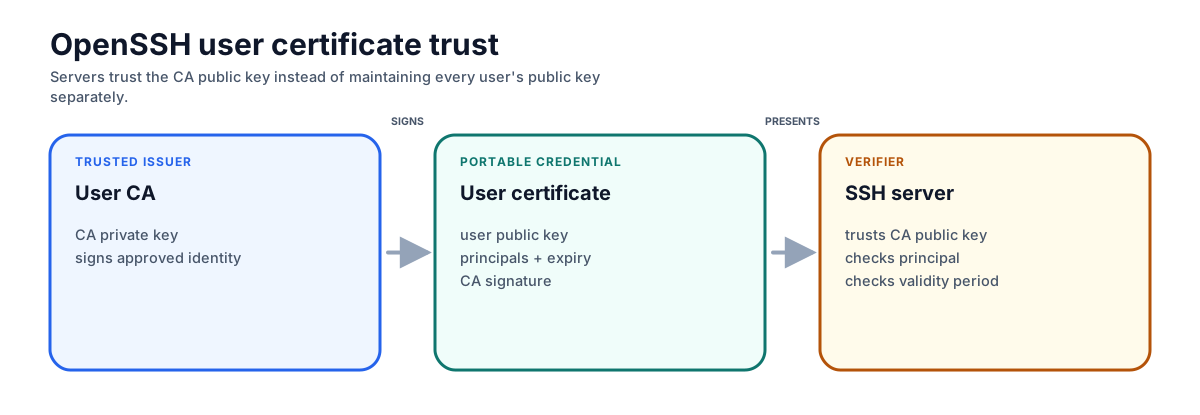
A server can validate many user certificates against one provisioned CA key while still checking principal, validity, critical options, extensions, and revocation.
- Host certificates remove first-use prompts only after clients are provisioned to trust the host CA, commonly through an
@cert-authorityentry or managed configuration. - User certificates replace many static
authorized_keysentries with certificates signed by a trusted user CA. The lifetime is an organizational risk choice; OpenSSH does not prescribe a universal 1–8 hour period. - Certificates do not eliminate lifecycle work: protect CA keys, constrain principals and extensions, monitor issuance, rotate CA trust deliberately, and distribute Key Revocation Lists (KRLs) or
RevokedKeysupdates when keys or certificates must be rejected.
Harden user-key operation and recovery
- Restrict static entries with
from=,command=,restrict,no-agent-forwarding,no-port-forwarding,no-pty, or other options appropriate to the account. Test that restrictions match the required workload. - Avoid agent forwarding to hosts that are not fully trusted. A compromised remote host cannot normally extract the agent’s private key, but it can request signatures from the forwarded agent while the connection remains available.
- Separate human, automation, host, and CA keys; record owner, purpose, authorized principals, source, expiry, and rotation state.
- Remove keys and principals promptly on compromise, transfer, or termination. Verify KRL distribution and cache/daemon reload behavior rather than assuming revocation propagated.
- Keep at least one controlled recovery path that does not bypass host verification or privileged-access approval. Test CA loss, host-key rotation, and emergency access.
- Use SSHFP only with a documented DNSSEC validation policy. Unsigned or non-validating DNS does not authenticate the fingerprint.
Modern key-exchange and migration options
Current OpenSSH releases can support hybrid post-quantum key-exchange algorithms such as mlkem768x25519-sha256 or sntrup761x25519-sha512 when both peers implement them. A hybrid exchange protects the session only when negotiation selects it and both implementations behave correctly; it does not make existing host/user signatures post-quantum. Inventory peer support and observe negotiation before removing classical fallbacks needed by managed legacy systems.
FIDO-backed SSH keys improve user-key custody but introduce hardware availability, middleware, resident-key, PIN/user-verification, and recovery considerations. Roll them out with multiple registered authenticators or another controlled recovery method.
Inspection commands
# Generate an Ed25519 user key pair.
ssh-keygen -t ed25519 -C "admin@example.com" -f ~/.ssh/id_ed25519

# Inspect a public-key fingerprint.
ssh-keygen -lf ~/.ssh/id_ed25519.pub

# Collect, but do not authenticate, a server host key.
ssh-keyscan -t ed25519 github.com 2>/dev/null | ssh-keygen -lf -

# Display the effective client configuration, including algorithm policy.
ssh -G example.com | grep -E '^(stricthostkeychecking|hostkeyalgorithms|kexalgorithms) '
ssh-keyscan collects keys over the network path being evaluated and cannot authenticate them. Compare its result with a fingerprint obtained through an independent authenticated channel before trusting it.
SSH host trust and user authentication are separate, session-bound decisions. Verify first-use host keys independently or provision a host CA, distinguish key types from signature algorithms, constrain and revoke user credentials operationally, and treat post-quantum or FIDO options as negotiated deployments with explicit recovery plans.
Primary references
- RFC 4253: SSH Transport Layer Protocol and RFC 4252: SSH Authentication Protocol — verified host authentication, exchange binding, and user-authentication mechanics.
- OpenSSH
ssh_configandsshd_config— verified current defaults, algorithm configuration, CA trust, and forwarding controls. - OpenSSH certificates and protocol specifications — verified certificate, FIDO-key, and key-exchange formats.
- RFC 6979: Deterministic DSA and ECDSA — verified deterministic ECDSA nonce generation.
- RFC 4255: DNS SSHFP Records — verified the DNSSEC-dependent fingerprint model.
- RFC 9846: TLS 1.3 — verified the current TLS 1.3 reference used in the comparison.