AI & LLM Security / Model Security
AI Model Supply Chain & Deserialization Safety
A model file looks like a large array of numbers, but the traditional PyTorch formats are not arrays — they are Python pickle streams, and pickle is a stack-machine bytecode that can name and call arbitrary functions while it loads. Loading an untrusted .pth or .pkl therefore runs attacker-chosen code before torch.load() returns anything to inspect. Two controls address this: weights_only=True restricts the unpickler, and safetensors removes the opcode stream entirely. Neither looks at the weights themselves, which is a separate problem.
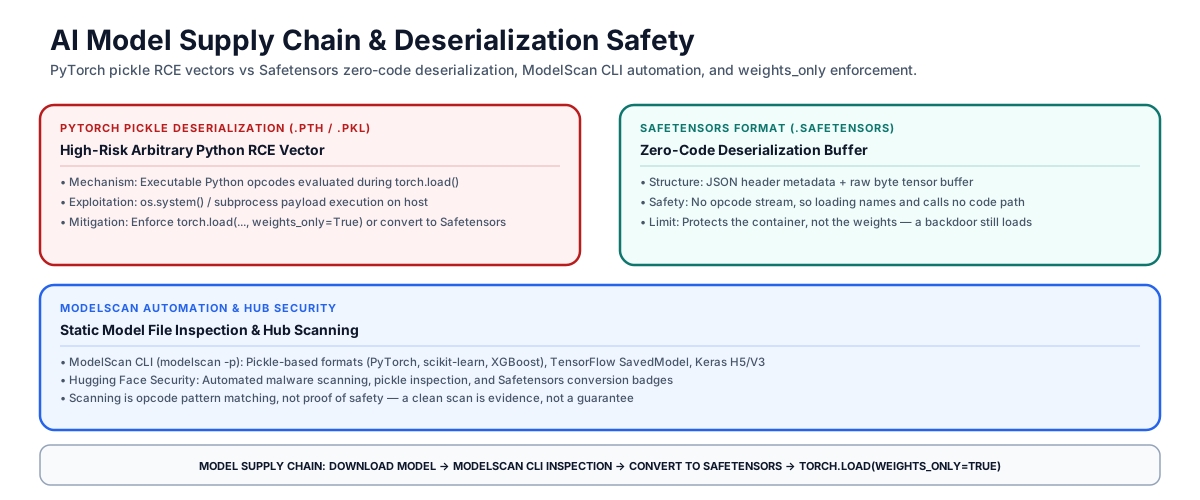
Model supply chain: pickle deserialization, the safetensors alternative, and where automated scanning fits
Why loading a pickled model runs code
Legacy PyTorch checkpoints (.pkl, .pth, and the older .bin convention) rely on Python’s pickle module. Pickle is not a static data format. It is a stack-based virtual machine whose opcodes can push a named callable onto the stack and then invoke it.
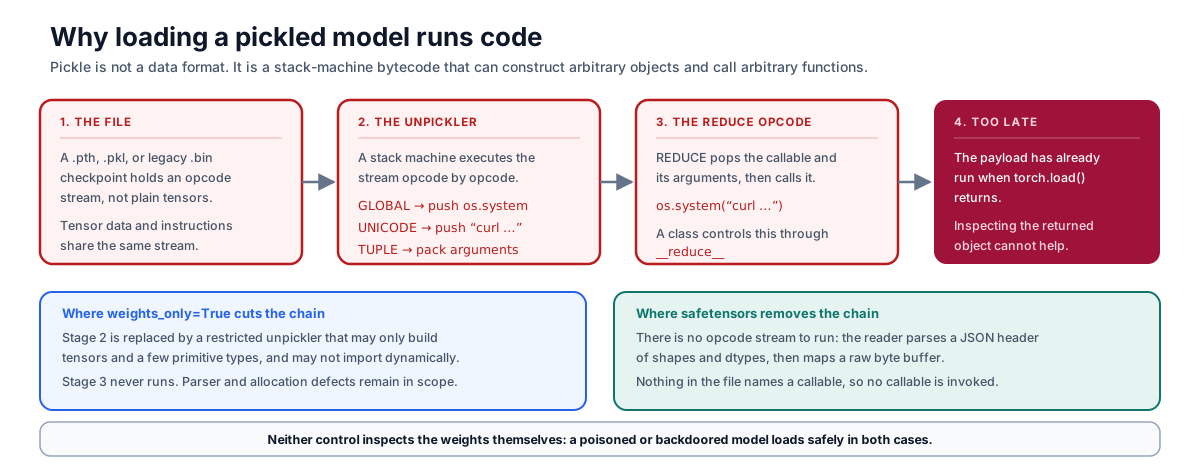
The pickle chain: GLOBAL names a callable, REDUCE invokes it, and the payload has run before torch.load() returns
When an application loads a model with torch.load("model.pth"), the unpickler executes that stream. A GLOBAL opcode names a callable such as os.system, the arguments are pushed, and REDUCE calls it — commonly reached through a class’s __reduce__ method. The payload runs during loading, so inspecting the returned object afterwards cannot detect it. This is what makes a backdoored checkpoint a working remote code execution primitive against an inference host.
Safetensors compared with pickle
Hugging Face’s safetensors format was designed to remove this class:
| Dimension | PyTorch pickle (.pth / .bin / .pkl) |
Safetensors (.safetensors) |
|---|---|---|
| Structure | Executable pickle opcode stream. |
JSON header of shapes and dtypes, followed by a raw byte tensor buffer. |
| Code execution on load | The file can name and call arbitrary callables. | Nothing in the file names a callable, so the reader invokes none. |
| Loading performance | Python object reconstruction. | Zero-copy memory mapping (mmap). |
| What it does not cover | — | The weights themselves. Parser and allocation defects remain in scope. |
| Ecosystem status | Historic default; still widespread in older checkpoints. | Default across Hugging Face and current tooling. |
The security claim is specific and worth stating precisely rather than absolutely. A 2023 independent audit commissioned by Hugging Face, EleutherAI, and Stability AI found no critical vulnerability permitting arbitrary code execution, and fixed three medium-severity issues including missing validation that had allowed polyglot files. That supports “the format does not provide a code-execution path”, not “the file is safe” — a poisoned or backdoored set of weights loads through safetensors perfectly cleanly.
Restricting the unpickler with weights_only=True
Where legacy checkpoints cannot be converted immediately:
import torch

# Unsafe on an untrusted file — the pickle stream executes during load:
# model = torch.load("untrusted_model.pth", weights_only=False)

# Restricted load: the unpickler may only rebuild tensors and a few primitives.
state_dict = torch.load("untrusted_model.pth", weights_only=True)
- Mechanism: the restricted unpickler may only execute the functions and build the classes needed for a
state_dictof plain tensors plus some primitive types, and it may not import anything dynamically. TheREDUCE-to-os.systempath never runs. - Default status: from PyTorch 2.6,
torch.loadusesweights_only=Truewhen thepickle_moduleargument is not passed. Passingpickle_modulerestores the old behavior. - The legacy exception: a checkpoint that stores a full
nn.Moduleobject rather than astate_dictcannot load under the restriction — PyTorch’s own guidance is to useweights_only=Falsefor those. That is a decision to trust the file’s origin, so it belongs with provenance evidence and a scan, not with a blanket rule. - Residual risk: the restriction removes arbitrary code execution. It does not remove denial of service through huge allocations, does not guarantee freedom from memory-corruption defects in the parser, and does nothing about poisoning inside the weights.
Scanning model artifacts with ModelScan
ModelScan is an open-source scanner (originally from Protect AI, since acquired by Palo Alto Networks) that inspects model files for unsafe deserialization operators without executing the model. It covers pickle-based formats (PyTorch, scikit-learn, XGBoost), TensorFlow SavedModel protobufs, Keras H5 and V3, and the cloudpickle, dill, and joblib variants.
pip install modelscan

# Scan a file or a directory of model artifacts. The path flag is -p / --path.
modelscan -p ./models/

# Machine-readable output for a pipeline to gate on:
modelscan -p ./models/ -r json -o modelscan-report.json
ModelScan reports issue counts by severity and exits non-zero when it finds them, so a CI step gates on the exit status:
# GitHub Actions step — fails the job on a non-zero scan exit status.
- name: Scan model artifacts
  run: modelscan -p ./ml_models/
An illustrative console summary for a backdoored file — the exact layout varies by version:
--- Summary ---
Total Issues: 1
Total Issues By Severity:
    - CRITICAL: 1
Unsafe operator found: 'system' from module 'os' in models/model.pkl
Scanning is opcode pattern matching against known-dangerous operators. A clean scan is evidence that no recognized unsafe operator is present; it is not proof that the artifact is safe.
What the controls do not address
Everything above concerns the container. Three risks sit outside it:
- Weight-level backdoors. A model trained or fine-tuned to behave adversarially on a trigger input loads cleanly through safetensors and passes every scanner. Detecting it is an evaluation problem, not a deserialization one.
- Provenance. Format safety says nothing about whether the artifact is the one the publisher produced. That needs signing or an access-controlled registry with verifiable lineage.
- Everything alongside the weights. Custom modeling code, tokenizer configuration, and remote-code loading options can execute independently of how the tensors are stored.
Diagnostic checklist
When auditing model ingestion pipelines and registries, evaluate these six criteria:
| Diagnostic area | Evaluation question | Audit evidence |
|---|---|---|
| Format policy | Are new artifacts stored as safetensors by default, with remaining pickle files inventoried rather than assumed absent? | Registry inventory by file extension. |
| Loader configuration | Is weights_only=True used for state_dict loads, with any weights_only=False call justified by provenance and a scan? |
Code review & static analysis results. |
| Automated scanning | Are incoming weights scanned before promotion, with the pipeline gating on the scan’s exit status? | Pipeline logs & scan reports. |
| Hub scan status | Does ingestion check the hub’s own malware and pickle scan status before pulling? | Ingestion verification logs. |
| Provenance | Are weights signed, or pulled from an access-controlled registry with verifiable lineage? | Registry signatures & access logs. |
| Runtime version | Are runtimes on PyTorch 2.6 or later so the restricted loader is the default? | Dependency pins & container base image tags. |
Pickle-based model files execute code during torch.load(), before there is anything to inspect. weights_only=True restricts the unpickler and is the default from PyTorch 2.6 when pickle_module is not passed; safetensors removes the opcode stream entirely. Both protect the container, not the weights — a backdoored model loads cleanly through either.
Primary references
- PyTorch serialization notes — verified the
weights_onlymechanism, the 2.6 default and itspickle_modulecondition, thenn.Moduleexception, and the stated residual risks. - safetensors — verified the header-plus-buffer structure and zero-copy loading.
- Safetensors audited as really safe — verified the audit scope, the absence of critical findings, and the medium-severity issues that were fixed.
- ModelScan — verified the CLI flags, supported formats, and reporting options.