Cloud-Native Security / Container Security
Container & Kubernetes Security
Containers are not lightweight virtual machines; they are isolated Linux process groups sharing the host kernel. Every isolation property comes from a kernel feature that can be weakened, and one of them — the user namespace — is not used at all unless a pod opts in, so container root is host root by default. On top of that, Kubernetes layers admission-time policy (Pod Security Standards), network policy that only works if the CNI plugin implements it, and optional service mesh mTLS that covers only the workloads inside the mesh. Knowing which layer is enforced, and by what, is most of the work.
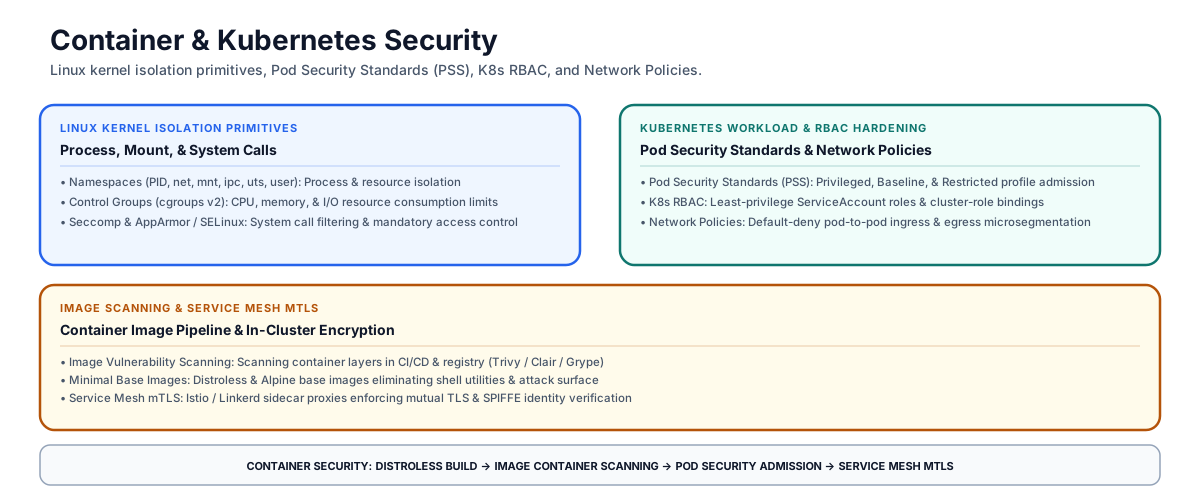
Container & Kubernetes Security Architecture: Linux Kernel Primitives ↔ K8s Pod Security Admission ↔ Service Mesh mTLS & Network Policies
Linux kernel isolation primitives
Containers rely on four Linux kernel features to establish process boundaries. Namespaces, cgroups and seccomp are applied by the container runtime as a matter of course — with one important exception noted below — while AppArmor and SELinux are a separate mandatory-access-control layer that must be configured deliberately.
| Linux Kernel Primitive | Core Isolation Function | Security Hardening Mechanism |
|---|---|---|
| Namespaces | Isolates system resources per container (PID, net, mnt, ipc, uts, user). | Prevents a container process from seeing or signaling processes running in other containers. The user namespace is the exception — see below. |
| Control Groups (cgroups v2) | Restricts and monitors resource consumption (CPU, memory, disk I/O, PIDs). | Bounds container denial-of-service (fork bombs, memory exhaustion) to the container’s own limits rather than the host. |
| Seccomp (Secure Computing) | Filters system calls available to a container process (e.g. blocking reboot, kexec_load). |
Restricts kernel attack surface by blocking dangerous or unnecessary Linux syscalls. |
| AppArmor / SELinux | Enforces Mandatory Access Control (MAC) policies on file paths and capabilities. | Restricts container file access even if a process acquires root privileges inside the container. |
The user namespace is opt-in, so container root is host root
Kubernetes does not use the user namespace unless the pod asks for it. The hostUsers field in the pod spec defaults to true, meaning the pod shares the host’s user namespace; a pod must set hostUsers: false to get its own. Without it, UID 0 inside the container is UID 0 on the host, and a container escape lands as real root.
This is why the other controls carry the weight they do. Running as non-root, dropping capabilities, and enforcing a MAC profile are not defense in depth layered on top of UID isolation — in a default cluster they are the isolation. When user namespaces are enabled, container root maps to an unprivileged host UID and capabilities become meaningful only inside the pod’s own namespace, which is a materially stronger position and worth the compatibility cost where the runtime and kernel support it.
Kubernetes Pod Security Standards (PSS)
Kubernetes enforces workload isolation through Pod Security Standards (PSS), built into the Pod Security Admission controller:
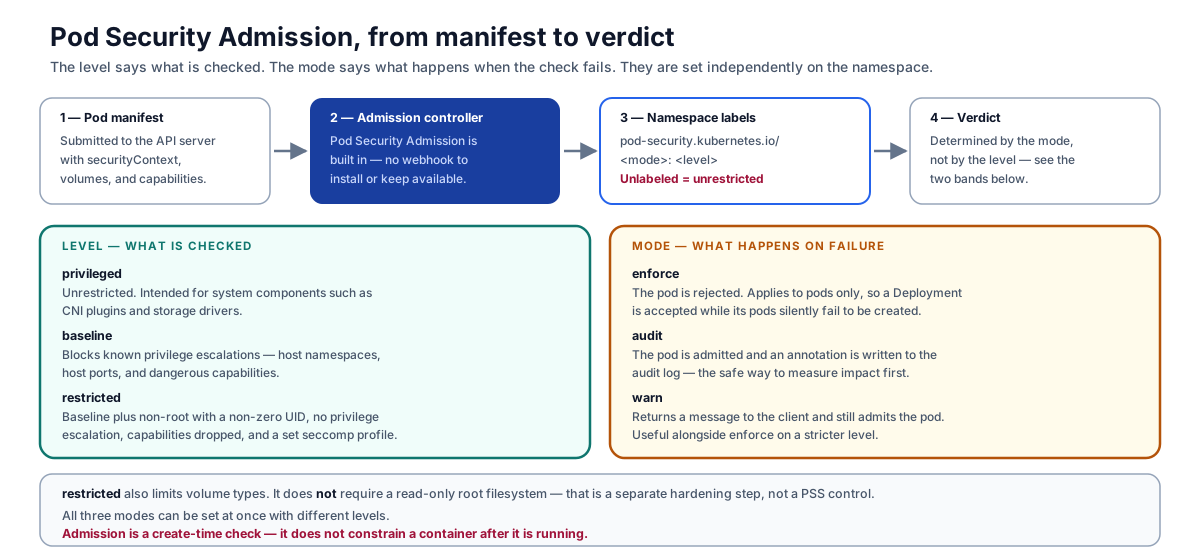
The level says what is checked; the mode says what happens when the check fails
- Privileged Profile: Unrestricted access. Disables security controls; intended only for system-level infrastructure pods (e.g., CNI plugins, storage drivers).
- Baseline Profile: Minimum security policy for standard workloads. Prevents known privilege escalations (blocks host namespaces, host ports, and dangerous capabilities).
- Restricted Profile: Heavily hardened. Adds to Baseline: run as non-root (
runAsNonRoot: true) with a non-zerorunAsUser, disallow privilege escalation (allowPrivilegeEscalation: false), drop all capabilities (drop: ["ALL"], with onlyNET_BIND_SERVICEaddable back), an explicitly set seccomp profile ofRuntimeDefaultorLocalhost, and a restricted list of volume types.
restricted does not require a read-only root filesystem. readOnlyRootFilesystem is not one of the Pod Security Standards controls at any level. It is a worthwhile hardening step, but it must be applied separately through the pod’s securityContext or an admission policy of your own — see Cloud & Distributed Secure Architecture Patterns for the read-only root and noexec scratch-space pattern.
Two further boundaries are easy to miss. Admission is a create-time check: it decides whether a pod is admitted and constrains nothing about a container once it is running. And the labels are namespace-scoped, so a namespace with no pod-security.kubernetes.io label is effectively privileged.
Kubernetes Network Policies & microsegmentation
By default Kubernetes pods are non-isolated: all inbound and outbound connections are allowed, and any pod can reach any other pod across namespaces.
Kubernetes Network Policies express declarative L3/L4 firewall microsegmentation:
# Example Default-Deny Ingress & Egress Policy
apiVersion: networking.k8s.io/v1
kind: NetworkPolicy
metadata:
  name: default-deny-all
  namespace: production
spec:
  podSelector: {}
  policyTypes:
  - Ingress
  - Egress
- Default-Deny Ingress/Egress: Block all pod-to-pod network traffic by default within a namespace.
- Explicit Allow Rules: Allow network traffic only between explicit label selectors (e.g. allow Frontend pods to connect to Backend pods on port
8080).
A NetworkPolicy with no enforcing plugin is a silent no-op
Network policies are implemented by the cluster’s network plugin, not by the API server. The Kubernetes documentation is explicit: creating a NetworkPolicy resource without a controller that implements it will have no effect. The object is accepted, stored, and returned by kubectl get netpol exactly as if it were working, and no error is raised anywhere.
This is the most consequential silent failure in Kubernetes segmentation, and it defeats the obvious audit method. kubectl get netpol -A proves that objects exist; it proves nothing about enforcement. Verify with a negative connectivity test instead — run a probe pod on the blocked side of the policy and confirm the connection fails:
# Ingress test: from outside the namespace, into a pod the default-deny should protect.
kubectl run probe -n default --rm -it --image=busybox --restart=Never -- \
  wget -qO- --timeout=3 http://backend.production.svc.cluster.local:8080

# Egress test: from inside the restricted namespace, outbound.
kubectl run probe -n production --rm -it --image=busybox --restart=Never -- \
  wget -qO- --timeout=3 http://example.com
A refused or timed-out connection is evidence of enforcement. A returned response means the policy is decorative, whatever the manifest says. Run both directions — a plugin can implement ingress and ignore egress.
Service mesh mTLS & SPIFFE identity
A Service Mesh (Istio, Linkerd) injects sidecar proxy containers alongside application pods and terminates connections in them:
- Mutual TLS (mTLS): Encrypts and mutually authenticates traffic between meshed workloads using short-lived X.509 certificates. Istio describes this as transport authentication — the proxies establish an encrypted connection beneath the application protocol. The mesh’s application-layer (L7) contribution is authorization policy over HTTP methods, paths, and headers, not the encryption itself.
- Coverage is the mesh, not the cluster. Only pods with an injected sidecar participate. Traffic to or from a pod outside the mesh is unaffected, and in Istio’s
PERMISSIVEmode a workload accepts both mTLS and plaintext — which is the intended migration posture but means encryption is not actually guaranteed untilSTRICTis set. Treat mesh coverage as something to verify per namespace rather than assume cluster-wide. - SPIFFE / SPIRE Identity: Assigns cryptographically verifiable identities (
spiffe://cluster.local/ns/prod/sa/backend) to workloads, enabling authorization policies that name a workload rather than an IP address.
Container security review checklist
The checklist below is a journal working model, not a published audit standard. When auditing a Kubernetes cluster and container pipeline, evaluate these six criteria:
| Diagnostic Area | Architectural Evaluation Question | Verification & Audit Evidence |
|---|---|---|
| Non-Root Execution | Are container workloads configured to run as non-root users (runAsNonRoot: true)? |
K8s Pod Security Admission audit logs. |
| Restricted PSS Profile | Is the Restricted Pod Security Standard enforced across all application namespaces, and is every namespace labeled at all? |
Namespace labels (pod-security.kubernetes.io/enforce: restricted); list of unlabeled namespaces. |
| Network policy enforcement | Do default-deny policies exist and does the CNI plugin actually enforce them? | NetworkPolicy manifests plus a negative pod-to-pod connectivity test proving traffic is blocked. |
| Minimal Base Images | Are container images built using Distroless or Alpine base images without unneeded tools? | Container build manifests (Dockerfile) & image scans. |
| K8s RBAC Least Privilege | Are ClusterRoleBindings restricted to prevent ServiceAccounts from managing cluster secrets? | K8s RBAC audit tool reports (e.g. krane, rbac-lookup). |
| Seccomp Profile Binding | Are default seccomp profiles (RuntimeDefault) bound to all running pod security contexts? |
Pod spec securityContext JSON (seccompProfile: {type: RuntimeDefault}). |
Containers share the host kernel, and the user namespace — the one that would stop container root from being host root — is off unless the pod sets hostUsers: false. The restricted Pod Security Standard requires non-root, no privilege escalation, all capabilities dropped, a set seccomp profile and limited volume types, but not a read-only root filesystem; admission is create-time only and an unlabeled namespace is unrestricted. A NetworkPolicy without a CNI plugin that implements it is accepted and enforces nothing, so verify with a connectivity test rather than kubectl get netpol. Mesh mTLS is transport-layer and covers only injected pods — and PERMISSIVE mode still accepts plaintext.
Primary references
- Kubernetes: Pod Security Standards — verified the complete control list for the privileged, baseline, and restricted levels, and confirmed that no level includes a
readOnlyRootFilesystemrequirement. - Kubernetes: Pod Security Admission — verified the three modes, the namespace label scheme, and that admission applies at object creation time.
- Kubernetes: Network Policies — verified the default non-isolated ingress and egress behavior and the statement that a NetworkPolicy created without a controller that implements it has no effect.
- Kubernetes: User namespaces — verified that
hostUsersdefaults totrueand that a pod must opt in withhostUsers: falseto use a user namespace. - Istio: Security concepts — verified that mTLS is established by the sidecar proxies as transport authentication, that it applies to workloads in the mesh, and that
PERMISSIVEmode accepts both mutual TLS and plain text. - CIS Kubernetes Benchmark — the cluster configuration baseline referenced by most Kubernetes CSPM tooling. Check the current version on this page before citing a specific revision.