Cryptography / Infrastructure
Public Key Infrastructure (PKI) & X.509 Certificates
Public Key Infrastructure (PKI) binds public keys to an identifier vetted by a trusted Certificate Authority (CA), using digital signatures. What that identifier actually proves depends on the validation level: the overwhelming majority of publicly-trusted TLS certificates today are Domain Validated (DV), meaning the CA confirmed the applicant controls the domain name — not that it verified any real-world organizational identity behind it. Organization Validated (OV) and Extended Validation (EV) certificates additionally vet a legal entity, but DV is the default for most web traffic. X.509 certificates provide the trust anchor for TLS, S/MIME, code signing, and mutual TLS (mTLS) identity verification across open networks.
Core PKI Components & Trust Model
PKI commonly uses a hierarchy where trusted Root CAs issue certificates to Intermediate CAs, which in turn issue leaf or end-entity certificates. Publicly trusted TLS subscriber certificates are increasingly short-lived under CA/Browser Forum policy; S/MIME, code-signing, private-PKI, and other end-entity certificate profiles can use different validity periods.
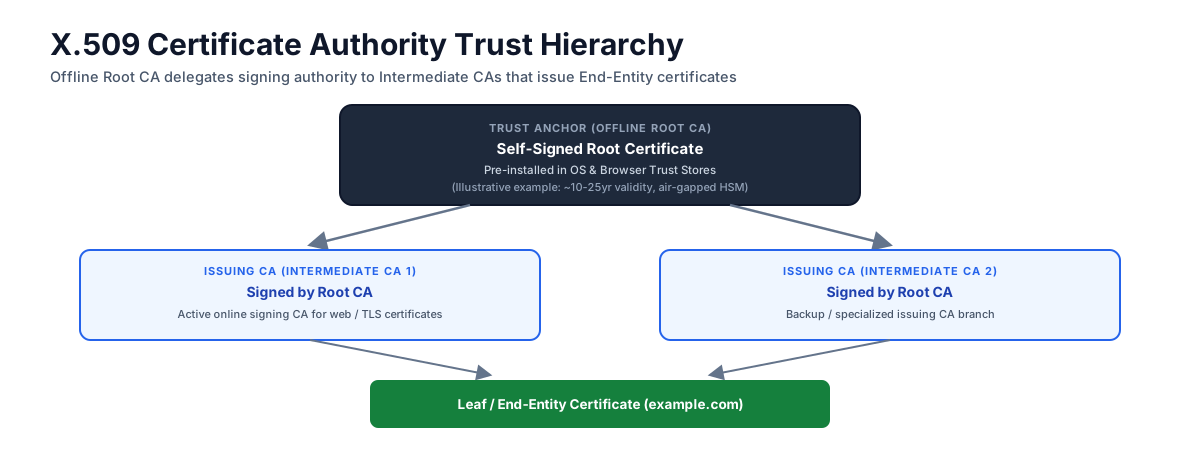
PKI trust hierarchy: Root CA delegates signing authority to Intermediate CAs
| PKI Component | Operational Role | Primary Security Property |
|---|---|---|
| Certificate Authority (CA) | Trusted entity that vets an identifier and signs X.509 certificates | Private key custody inside HSM; protects root of trust. |
| Certificate Revocation List (CRL) / OCSP | Revocation status mechanisms publishing invalid certificate serial numbers | Best-effort defense against compromised or misissued certificates — most browsers soft-fail (proceed with the connection) when a revocation check is unavailable, so it is not an absolute guarantee. |
| Registration Authority (RA) | Verifies domain control (DV) or, for OV/EV issuance, organizational identity, prior to issuance | Enforces domain control validation (DNS-01, HTTP-01) for DV; additional business-registry checks for OV/EV. |
| Trust Store | Pre-installed list of trusted Root CA certificates embedded in OS / browser | Establishes local trust anchors used during path validation (RFC 5280 §6): chain building to a trusted root, signature verification at each hop, validity-period and name-constraint checks, and — where enforced — revocation status. |
What “Validating a Certificate” Actually Means
“Certificate validation” bundles together several distinct checks that a client must perform, and a failure in any one of them is a different failure mode from the others:
- Path Building: Given a leaf certificate, locate a chain of intermediate certificates connecting it to a Root CA already present in the local trust store. A server that omits a required intermediate, or presents intermediates out of order, can cause path building to fail even when a valid chain exists in principle — this is why “include the full intermediate chain” is standard TLS deployment advice.
- Path Validation: For the chain path building found, cryptographically verify each signature (leaf signed by intermediate, intermediate signed by root), confirm each certificate is within its validity window, and check policy constraints (basic constraints, name constraints, key usage/EKU) at every hop per RFC 5280 §6. This confirms the chain is cryptographically well-formed and policy-compliant — it does not yet confirm the certificate belongs to the host the client is talking to.
- Endpoint (Hostname) Verification: Separately from chain validation, the client must confirm the hostname it intended to connect to appears in the certificate’s Subject Alternative Name (SAN) field, per RFC 9525 (which obsoletes the earlier RFC 6125). This step is easy to omit in custom TLS client code (hence a long history of vulnerabilities where a valid, trusted certificate for any domain was accepted for connections to every domain) and is worth calling out explicitly: a chain can pass path validation perfectly while still being the wrong certificate for the connection, if hostname verification isn’t performed.
- Revocation Checking: Query CRL or OCSP (see below) to confirm the certificate hasn’t been revoked since issuance — a check that is best-effort in most real deployments (see the Trust Store row above) rather than a hard requirement.
- Certificate Transparency: Separately, confirm the certificate carries the SCTs a given browser vendor’s policy requires (see Certificate Transparency) — a detection mechanism for rogue issuance, not part of RFC 5280 path validation itself.
Treating these as one monolithic “is this cert valid?” check, rather than as separable phases each with its own failure mode, is a common source of both security bugs (skipped hostname verification) and operational bugs (misdiagnosing a path-building failure as a revocation problem, or vice versa).
Anatomy of an X.509 v3 Certificate (RFC 5280)
Specified in RFC 5280, an X.509 v3 certificate structures identity metadata into standard fields signed by a CA:
Domain CT Log Issuance Inspector
Enter any public domain name (e.g. google.com, github.com) to query its Certificate Transparency (CT) log issuance records via CertSpotter API. Shows the most recent issuance among the certificates returned by a single API page — a domain with an unusually large issuance history could have newer certificates beyond that page (see code comment).
| Field Name | Standard Function | Critical Security Check |
|---|---|---|
| Basic Constraints | Indicates whether subject is a CA (cA: TRUE vs cA: FALSE) |
Leaf certificates must never assert cA: TRUE. Depending on the issuing CA’s profile, they either omit this extension entirely (which defaults to non-CA per RFC 5280 §4.2.1.9) or include it explicitly set to cA: FALSE — either form prevents the leaf key from minting further certificates. |
| Extended Key Usage (EKU) | Specifies the purposes relying applications should accept the certificate for (Server Auth, Client Auth, Code Signing), per RFC 5280 §4.2.1.12 | Signals that a well-behaved code-signing verifier should reject a signature made with a Server-Auth-only certificate — it constrains what compliant relying parties accept, not what the private key is physically capable of signing; the key itself can still produce a mathematically valid signature over anything. |
| Subject Alternative Name (SAN) | Lists the identifiers bound to this certificate — not just exact FQDNs: dNSName entries (including wildcards like *.example.com), iPAddress entries, and other GeneralName forms (e.g. otherName, email/URI where applicable) |
For public Web PKI browser TLS, the requested DNS name or IP address is matched against the corresponding SAN identifier and does not fall back to commonName (CN), as described by RFC 9525. Other X.509 use cases apply their own governing profiles and are outside RFC 9525’s service-identity scope. |
| Validity Period | Defines Not Before and Not After timestamp bounds |
For publicly-trusted TLS subscriber (server/leaf) certificates specifically, the CA/Browser Forum Baseline Requirements cap maximum validity at 200 days as of March 15, 2026; 100 days as of March 15, 2027; and 47 days as of March 15, 2029. These caps do not apply to private/internal PKI, most S/MIME or code-signing certificates, or CA (root/intermediate) certificates, which follow different lifetime rules. |
Certificate Lifecycle & Automated Issuance (ACME & ARI)
Managing short-lived certificates at scale requires automated enrollment via the Automated Certificate Management Environment (ACME / RFC 8555) protocol:

Automated ACME lifecycle: domain validation, issuance, renewal, and a layered revocation path whose coverage, freshness, and failure behavior depend on the relying party
Certificate Lifetime Shrinkage Timeline
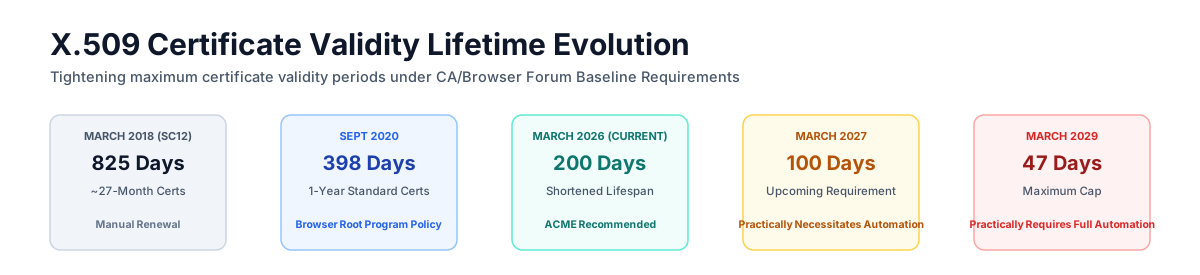
Publicly-trusted TLS subscriber certificate lifetime evolution: transition from multi-year (825-day) static certificates to automated short-lived certificates, tightening from 200 days today to a 47-day maximum by March 2029
ACME Renewal Information (ARI, RFC 9773)
To support these shrinking (200-day today, 47-day by 2029) certificate lifetimes without outages, ACME Renewal Information (ARI) (RFC 9773, published as a Proposed Standard in 2025) allows CAs to suggest optimal renewal windows to automated agents dynamically before expiration.
Revocation in Practice: Why It’s Not Uniformly Reliable
Revocation exists to handle the case a certificate’s validity period can’t: a key compromised, or a certificate mis-issued, before it would naturally expire. In practice, no single revocation mechanism gives every client a fast, reliable answer, which is exactly why the “best-effort” framing appears repeatedly on this page rather than a flat guarantee.
- CRLs (Certificate Revocation Lists): A CA-signed, periodically-updated list of revoked certificate serial numbers. Clients that check CRLs must fetch and parse a list that can grow to significant size for a large CA, and the list is only as fresh as its last publication — a certificate revoked minutes ago may not appear until the next scheduled CRL update.
- OCSP (Online Certificate Status Protocol): A real-time, per-certificate query to the CA (or its OCSP responder) asking “is this serial number revoked?” This avoids downloading a whole list, but introduces its own problems: it leaks browsing metadata to the CA (which domains a client is visiting), it adds a network round-trip (and a failure point) to every connection, and — critically — most browsers soft-fail when the OCSP responder is unreachable, meaning an attacker who can block the OCSP request (a common capability for someone already in a position to MitM a connection) can often make a revoked certificate appear valid simply by preventing the revocation check from completing.
- OCSP Stapling: The server itself periodically fetches a signed OCSP response from the CA and “staples” it to the TLS handshake, so the client does not need its own round-trip to the CA. This fixes the metadata-leak and latency problems, but only works if the server keeps its stapled response current. What happens on a missing or expired staple is not uniform — it varies by client and policy. An ordinary client with no specific expectation typically proceeds anyway, while a certificate carrying the TLS Feature extension (“Must-Staple,” RFC 7633) requests stapling support. A server implementing that feature is required to provide the requested status response, but RFC 7633 says a client may reject a connection when the server fails to do so; actual hard-fail behavior depends on the client and deployment profile.
- Short-lived certificates as a revocation substitute: As the CA/Browser Forum’s shrinking maximum-lifetime rules (200 days now, 47 days by 2029) take effect, some deployments increasingly treat “the certificate will expire soon anyway” as a partial substitute for timely revocation — a compromised key is only usable until natural expiry, bounding the exposure window without needing every client to check revocation status correctly. This reduces reliance on revocation checking without eliminating the need for it (a 47-day exposure window is still a real window).
- Browser-specific mechanisms: Beyond CRL/OCSP, some browsers maintain their own aggregated revocation data pushed directly to the client. Chrome’s CRLSet and Firefox’s legacy OneCRL are curated subsets — they cover only a hand-picked set of “important” revocations, not every revoked certificate. Firefox’s newer CRLite is different in kind: Mozilla compresses the revocation status of essentially all certificates from CT-logged, enrolled CAs into a compact local filter (published at roughly 300 KB/day), aiming for comprehensive coverage rather than a curated subset — see Mozilla’s CRLite announcement. All of these trade some combination of coverage, freshness, or storage cost for a fast, always-available local check that doesn’t depend on a live network request to the CA at connection time.
The practical upshot: revocation checking is a layered, best-effort defense with real gaps at every layer (staleness, soft-fail, partial coverage), not a single reliable mechanism — which is also why shrinking certificate lifetimes are treated as a complementary mitigation, not a replacement for revocation.
Certificate Formats & OpenSSL Encoding Conversions
X.509 certificates and private keys show up under five commonly seen format markers — though these aren’t five instances of one consistent category: PEM and DER are encodings (ASCII-armored vs. binary ASN.1), PKCS#7 and PKCS#12 are containers (bundling multiple objects together), and .crt/.cer is an ambiguous file extension that says nothing about the underlying encoding on its own:
| Format Extension | Encoding Type | Typical Content | Target Application Use Case |
|---|---|---|---|
| .pem | Base64 ASCII with -----BEGIN ... ----- armor |
Certificates, Private Keys, CSRs, CA Chains | Standard default for Linux, NGINX, Apache, and OpenSSL. |
| .der | Binary ASN.1 encoding | Single Certificate or Private Key | A DER-encoded certificate imported into a Java KeyStore (JKS) or PKCS#12 store, Windows OS binary certs, smart cards — DER itself is a certificate/key encoding, not a keystore format. |
| .crt / .cer | Ambiguous — either Base64 PEM or binary DER, depending on platform/tool | Single Certificate (rarely a private key) | The extension alone does not tell you the encoding; inspect the file (file cert.crt or look for a -----BEGIN header) before assuming a format. |
| .p7b / .p7c | PKCS#7 container (Base64 or binary) | Certificate Bundles & CRLs (No Private Keys) | Windows IIS, S/MIME email signature verification. |
| .pfx / .p12 | PKCS#12 password-protected binary container | Bundles Leaf Cert + Private Key + CA Chain | Windows IIS, Tomcat, macOS Keychain, Android system certs. |
OpenSSL CLI Reference Cheat Sheet
OpenSSL CLI Code Generator
Select any common certificate operation below, customize variables, and copy the exact syntax required for your local console terminal.
Certificate & Public Key Pinning (Mobile & Native App Defense)
Standard PKI path validation trusts any applicable pre-installed Root CA in an OS trust store — meaning any root whose path constraints and policies permit issuance for your domain and certificate purpose — to issue certificates for your domain. The exact count of trusted roots varies by platform and OS version, but is commonly on the order of 100+; not every one of those roots is actually unconstrained for every domain, since name-constrained or policy-constrained intermediates can narrow which roots can issue for a given name in practice. Certificate Pinning (or Public Key Pinning) adds an additional restriction on top of standard X.509 path validation and hostname verification — it does not replace or skip them. A pinned connection still must pass ordinary chain building, signature verification, and name checking; pinning then further requires that a specific, pre-declared public key hash also appear in the chain, narrowing acceptance from “any trusted Root CA in the OS store” down to a pre-declared set (often the server’s own SPKI plus one or more backup pins, not necessarily a single key).
Pinning Target Strategies
| Pinning Strategy | Target Object Pinned | Maintenance & Operational Risk | Primary Use Case |
|---|---|---|---|
| Leaf Certificate Pinning | Hashes full leaf X.509 certificate | Highest rotation sensitivity: Leaf cert expiration or emergency ACME renewal breaks app connectivity unless an app update is deployed. | High-security ephemeral IoT sessions. |
| Intermediate / Root CA Pinning | Hashes public key of issuing CA | Lower certificate-renewal sensitivity: Leaf certs can rotate freely, but issuing CA key rotation or intermediate retirement breaks client connections. | Enterprise mobile applications. |
| SPKI Public Key Pinning | Hashes the complete DER-encoded SubjectPublicKeyInfo structure — the algorithm identifier plus the public key bit string together, per RFC 7469, not the bit string alone |
Survives certificate renewal only while pinned key remains unchanged: Re-issuing leaf certs using the same key pair maintains pin validity, but key compromise or key rotation without a valid backup pin breaks connectivity. | Native mobile app transport security. |
Pinning Scope: Public CA vs. Private CA Deployment
Certificate pinning applies to both Public PKI and Private PKI environments, addressing distinct threat vectors:
- Public CAs (e.g. Let’s Encrypt, DigiCert, Sectigo): Mobile OS trust stores pre-install a large number of commercial Root CAs — the exact count is platform- and version-specific. If a single Public CA is compromised or coerced into issuing a fake certificate for your domain (
api.example.com), standard TLS path validation accepts the forged cert. Pinning your server’s SPKI key hash (plus at least one backup pin) forces native apps to reject any chain that doesn’t present one of the pinned keys, regardless of which of those Root CAs signed it — narrowing trust to the pinned set rather than to a single key. - Private CAs (Internal / Enterprise PKI): Used inside corporate networks, mTLS microservice meshes, and IoT fleets (e.g. HashiCorp Vault PKI, AWS Private CA). Pinning the Private CA Root/Intermediate key inside native apps prevents corporate SSL decryption proxies (e.g. Zscaler, Charles Proxy) or user-installed custom root certificates from eavesdropping on enterprise API traffic.
Security Risks & Threat Vectors of Pinning
While pinning protects network transport against rogue CAs, it introduces significant security trade-offs and threat vectors:
| Security Risk / Threat Vector | Attack Mechanics & Impact | Engineering Mitigation |
|---|---|---|
| Self-Inflicted Security DoS | If an emergency key revocation occurs (e.g. private key leak) and no matching backup pin exists in the app binary, deployed client instances lose API connectivity, preventing over-the-air API security patches. | Always configure at least one Backup SPKI Pin derived from an offline, cold-storage key pair. |
| Pin-Jacking / Hostage Attack | An attacker who briefly compromises server header configurations can inject malicious pins, locking legitimate clients out of the legitimate service indefinitely. | Primary reason HPKP was deprecated in browsers. Restrict pinning configurations to signed native app code bundles. |
| Client-Side Bypass (Frida / Jailbreak) | Attackers analyzing mobile apps on rooted/jailbroken devices easily bypass pinning using dynamic instrumentation tools (Frida, Objection) to hook TLS validation routines. | Treat pinning as a network-layer defense, not a client-side reverse engineering barrier. Combine with root/jailbreak detection and obfuscation. |
| CA Intermediate Migration Failure | If an issuing CA retires an Intermediate certificate authority (e.g. Let’s Encrypt R3 to R10), pinned clients that hardcoded the Intermediate CA key drop connection. | Pin SubjectPublicKeyInfo (SPKI) of your own key pair, or pin the Root CA key rather than transient Intermediate keys. |
Understanding where Certificate Pinning belongs prevents catastrophic self-inflicted Denial of Service (DoS):
- Web Browsers (Deprecated): HTTP Public Key Pinning (HPKP), specified by RFC 7469, is no longer a deployable web-platform control in major browsers. Chromium announced deprecation and removal of HTTP-based dynamic pinning for Chrome 67; Mozilla disabled HPKP by default and then removed HPKP header and cached-pin processing in Firefox 78. Public-web defenses now rely on browser CT policy and other platform controls rather than a site-supplied HPKP header.
- Mobile & Native Apps (Situational — Use Deliberately): Certificate and SPKI pinning can add defense-in-depth for iOS and Android native applications against corporate TLS proxies, local MitM interception, and rogue CA issuance. However, both platform vendors caution against reaching for static public key pinning by default: Android's official guidance and Apple's PKI guidance advise that pinning carries high operational risk during key rotation, recommending it only for applications with a specific, well-understood threat model and a tested pin-rotation process.
- Backup Pin Recommendation Rule: If you choose to deploy pinning, mobile app configurations are strongly recommended to specify at least one backup pin (a secondary public key hash held in cold storage) to allow key rotation without bricking deployed application instances (Android's documentation advises including a backup pin, though schema validation itself does not block single-pin blocks).
Native Mobile Pinning Configuration Examples
Android Network Security Config (res/xml/network_security_config.xml)
<?xml version="1.0" encoding="utf-8"?>
<network-security-config>
    <domain-config cleartextTrafficPermitted="false">
        <domain includeSubdomains="true">api.example.com</domain>
        <pin-set expiration="2027-01-01">
            <!-- Primary Pin: SHA-256 hash of SubjectPublicKeyInfo -->
            <pin digest="SHA-256">cUPcScTJnGGxEvWYspA5vF9VPol17BskT1hB64GVAHw=</pin>
            <!-- Backup Disaster Recovery Pin (Cold Storage Key) -->
            <pin digest="SHA-256">M8HwxWaMH1ECCkg4AgWFiUsS55TF0bT3A89LBFJgMqU=</pin>
        </pin-set>
    </domain-config>
</network-security-config>
iOS Network Transport Security (Info.plist)
<key>NSAppTransportSecurity</key>
<dict>
    <key>NSPinnedDomains</key>
    <dict>
        <key>api.example.com</key>
        <dict>
            <key>NSIncludesSubdomains</key>
            <true/>
            <key>NSPinnedCAIdentities</key>
            <array>
                <dict>
                    <key>SPKI-SHA256-BASE64</key>
                    <string>cUPcScTJnGGxEvWYspA5vF9VPol17BskT1hB64GVAHw=</string>
                </dict>
                <dict>
                    <key>SPKI-SHA256-BASE64</key>
                    <string>M8HwxWaMH1ECCkg4AgWFiUsS55TF0bT3A89LBFJgMqU=</string>
                </dict>
            </array>
        </dict>
    </dict>
</dict>
Post-Quantum Hybrid Certificates
As PKI migrates toward quantum safety, Certificate Authorities and standards groups (IETF LAMPS working group) are standardizing Post-Quantum Hybrid Certificates:
- Dual-Algorithm / Composite Certificates (draft-ietf-lamps-pq-composite-sigs): Binds both a classical public key (e.g. RSA-3072 or ECDSA P-256) and a post-quantum public key (e.g. FIPS 204 ML-DSA) under a single composite algorithm identifier.
- Interoperability & Transition Mechanics: Non-upgraded legacy clients cannot parse or fall back to verifying only the classical signature component of a composite certificate, as they do not recognize the composite algorithm OID (the IETF draft explicitly notes that upgraded/non-upgraded interoperability is not directly provided by composite signatures). Upgraded/non-upgraded interoperability is therefore achieved through parallel certificates (dual X.509 certificate chains) or negotiated protocol parameters rather than in-place composite fallback.
Root CAs sign intermediates, which sign leaf certificates; path validation does not replace hostname verification against the leaf certificate's SAN. As public TLS validity periods shrink, automate issuance and renewal at scale. ACME is one standardized automation protocol, and ARI lets supporting CAs suggest renewal windows; ARI improves scheduling but is not required for renewal.
Primary references
- RFC 5280: Internet X.509 Public Key Infrastructure Certificate and CRL Profile — IETF RFC 5280
- RFC 8555: Automatic Certificate Management Environment (ACME) — IETF RFC 8555
- RFC 9773: ACME Renewal Information (ARI) Extension — IETF RFC 9773
- RFC 7469: Public Key Pinning Extension for HTTP (Proposed Standard) — RFC Editor: RFC 7469
- CA/Browser Forum Baseline Requirements: Baseline Requirements for the Issuance and Management of Publicly-Trusted TLS Server Certificates — CA/Browser Forum BRs
- Android Network Security Config: Network Security Configuration Pinning Guidance — Android Developer Security Config
- Apple PKI Guidance: Identity & Public Key Pinning Guidance — Apple Developer News
- IETF Composite Signatures Draft: Composite Signatures For Use in X.509 Public Key Infrastructure — draft-ietf-lamps-pq-composite-sigs